Once all client details are completed and saved, you can get an overall summary view of all tabs. You need to enter contact details of a person from the client’s side for future activities.
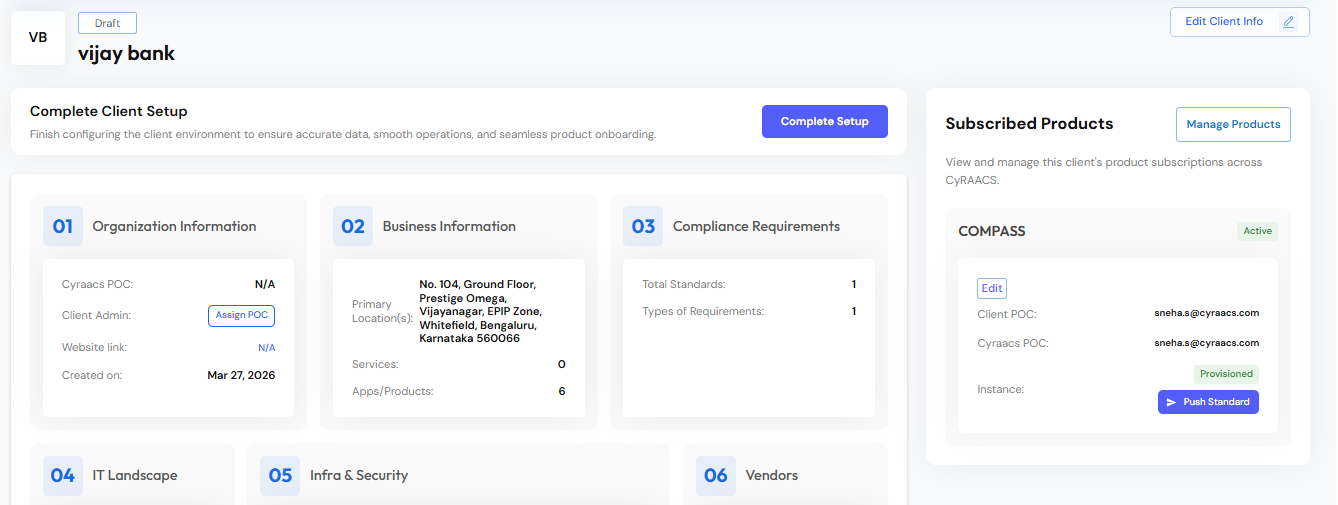
By clicking on the client tile on the main page, you can find the summary of all the entered information.
-
It is important to have a Point Of Contact (POC) on both sides – Service provider and Client. Under Organization Information, click Assign POC, enter Service provider POC name and the Client POC details.
Once you have provisioned the instance, you cannot change the POC.
-
Click Edit Client Info to make any changes to client information on any of the tabs.
-
Click Manage Products in the ‘Subscribed Products’ tile, to enable the relevant product as per the client’s needs.
Provision Instance
Once you have created the client, you can provision the COMPASS instance before generating controls and tasks. Click Provision Instance.